
2026 Releases
This page contains all release notes from 2026, ordered from newest to oldest.
Release 2026-06-26
New Features
V2.22.19
- Notifications
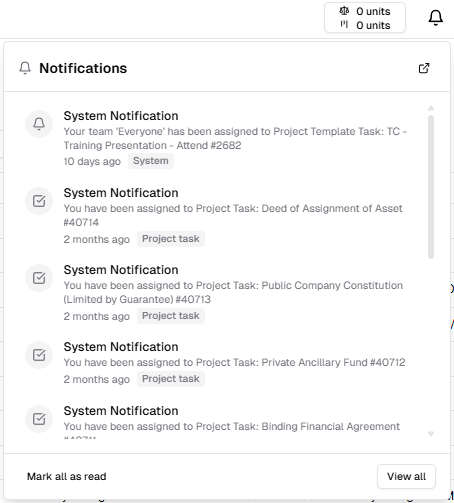
- Updated UI on the Notifications dropdown to provide a cleaner look, and added a View All button.
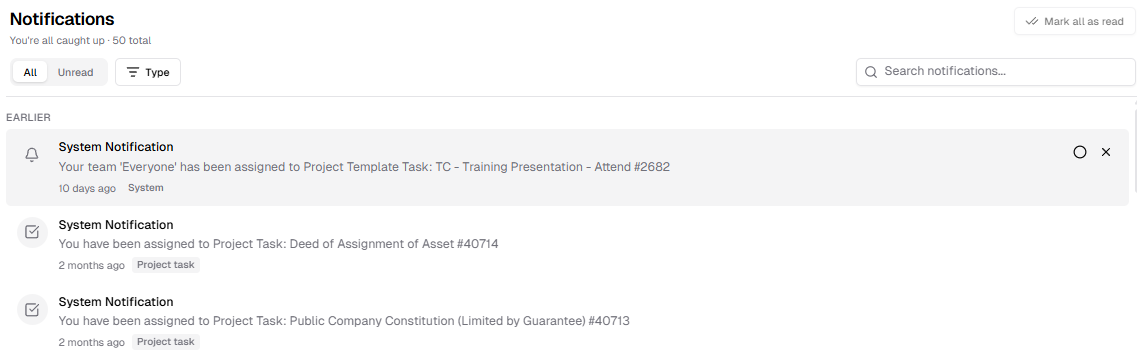
- Added a Notifications page where the user can view all Notifications. This view allows you to search, filter by unread, filter by area of the platform the notification relates to, mark all as read, and select multiple notifications to delete or mark as read.
- Updated UI on the Notifications dropdown to provide a cleaner look, and added a View All button.
Enhancements
V2.22.18
- Notes
- UI Updated to be more in-line with email UI, with a list of the notes available on the left and the full text of the note displayed on the right. Notes can also be filtered by All, User and System
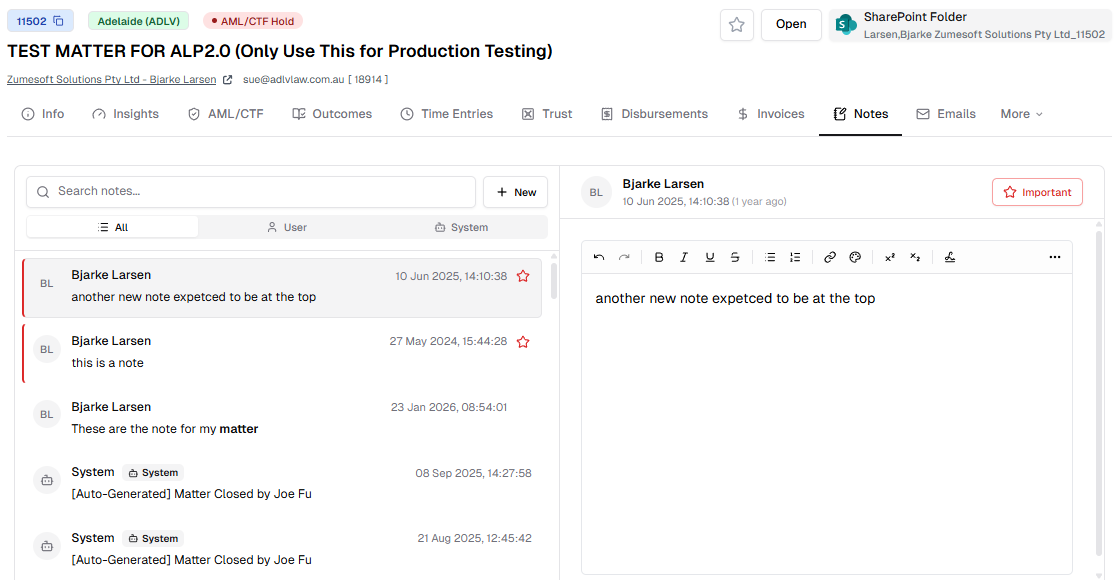
- UI Updated to be more in-line with email UI, with a list of the notes available on the left and the full text of the note displayed on the right. Notes can also be filtered by All, User and System
- System
- Reworked the permissions for Syntaq Records
- AML/CTF
- Matters under a designated offering can no longer move from Quoted to Open, or have time entries assigned to them if their AML/CTF process is not completed. The user will be presented with an error if they try to progress.
- Matter Report
- Now displays Estimated Budget
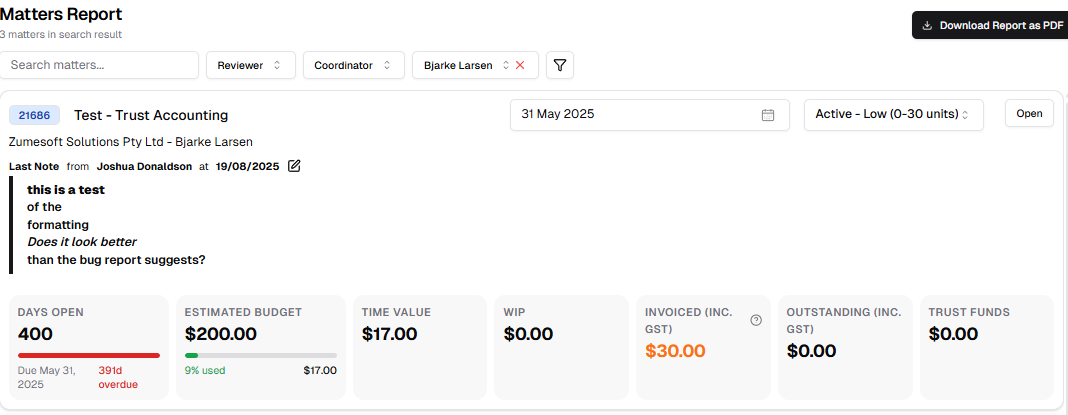
- Now displays Estimated Budget
- Syntaq Records
- Records managed by Portal can now be viewed and accessed in bulk on the Syntaq Records page. Clicking a Record will open it in the relevant Form. Records can be filtered by Matter or Form. The previous view can be accessed via the Remote Site tab.
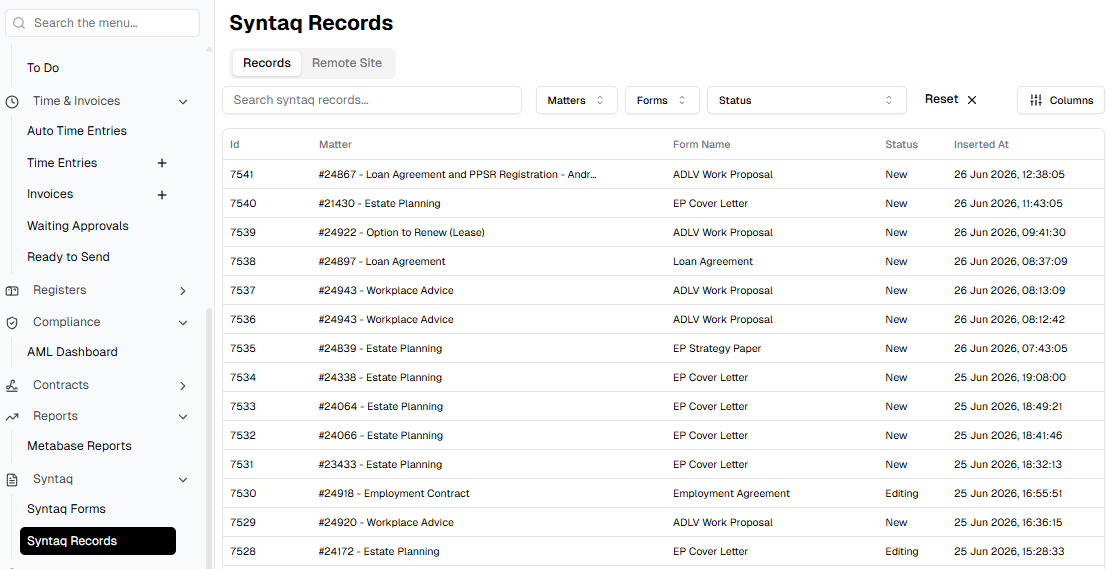
- Records managed by Portal can now be viewed and accessed in bulk on the Syntaq Records page. Clicking a Record will open it in the relevant Form. Records can be filtered by Matter or Form. The previous view can be accessed via the Remote Site tab.
- Mail Register
- Added filters for the mail register for Sender, Recipient and Matter
V2.22.21
- AML/CTF
- Updated the Customer Due Diligence process for Matters where the Client is a pairing of Contact and Organisation, to allow the user to choose whether the CDD is required for the Organisation or the Contact or both, for this Matter.
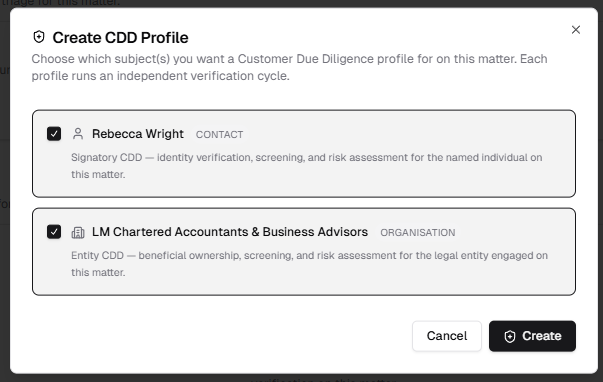
- Updated the Customer Due Diligence process for Matters where the Client is a pairing of Contact and Organisation, to allow the user to choose whether the CDD is required for the Organisation or the Contact or both, for this Matter.
V2.22.22
- Notes
- UI update
Fixes
V2.22.19
- Outgoing Email Audit Log
- Fixed a UI Issue
- AML/CTF
- Resolved an issue where time entries were blocked unnecessarily
V2.22.20
- Offerings
- Fixed an issue with foreign keys stopping the merge of offering outcomes
- System
- Resolved an endpoint issue causing issues with time entry conversion
Release 2026-06-15
New Features
V2.22.14
- System
- TFA api keys can now be configured from the user info page
V2.22.15
- System
- Added Model Control Protocols for AI model integration with whole platform
Enhancements
V2.22.11
- Email
- Signatures updated to be internally consistent
- Trust Accounting
- Added Matter Id into Trust Account Receipt and Trust Statement email subjects
- System
- Updated Tenant settings and system integrations pages
V2.22.12
- AML/CTF
- Reworked so that the VOI is per individual and Client Disclosure Form is per Matter
V2.22.13
- Email
- Signature logo width reduced and editor updated
- AML/CTF
- Reworked the Client Disclosure Form based on feedback, including classifying countries by risk without user input
- Reworked the escalation process so that any other offering reviewer can sign-off the CD Form
- Made the escalation workflow more user-friendly
- Reworked screening process and how Politically Exposed Persons are determined
V2.22.14
- Roles
- Permissions now hard-delete to avoid duplication
V2.22.16
- AML/CTF
- Can now restart a Client Disclosure form
V2.22.17
- AML/CTF
- Updated dashboard
Fixes
V2.22.11
- Email
- Follow up fixes to Email load fixes from previous release
- Print Email no longer crashes
- System
- Resolved an issue with a test
- Fixed an issue where no fee data would stop Syntaq forms from loading
V2.22.12
- Email
- Resolved an issue with the signature block
V2.22.15
- Trust/Safe Storage
- Resolved a permission issue causing issues with access to Trust via a Matter and Safe Storage pages
- System
- Fixed an MCP access issue with wiki
V2.22.16
- Trust
- Resolved issue with missing Statutory Deposit button
Release 2026-06-01
New Features
V2.22.8
- System
- Added an outgoing email log to track emails sent by the system, either automatically or via the email modal
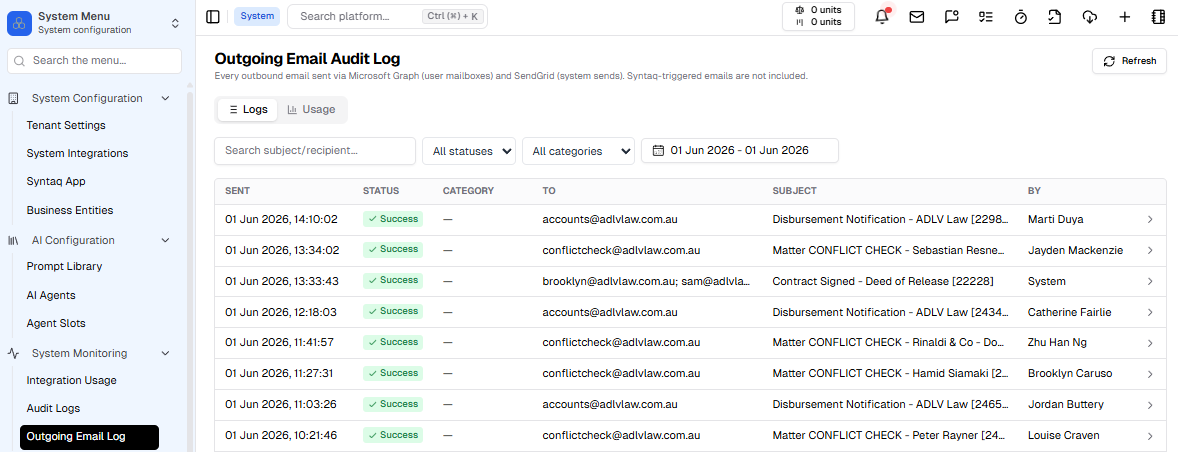
- Added an integration usage page for analytics on third-party services, allowing us to track request load, errors, response time and performance
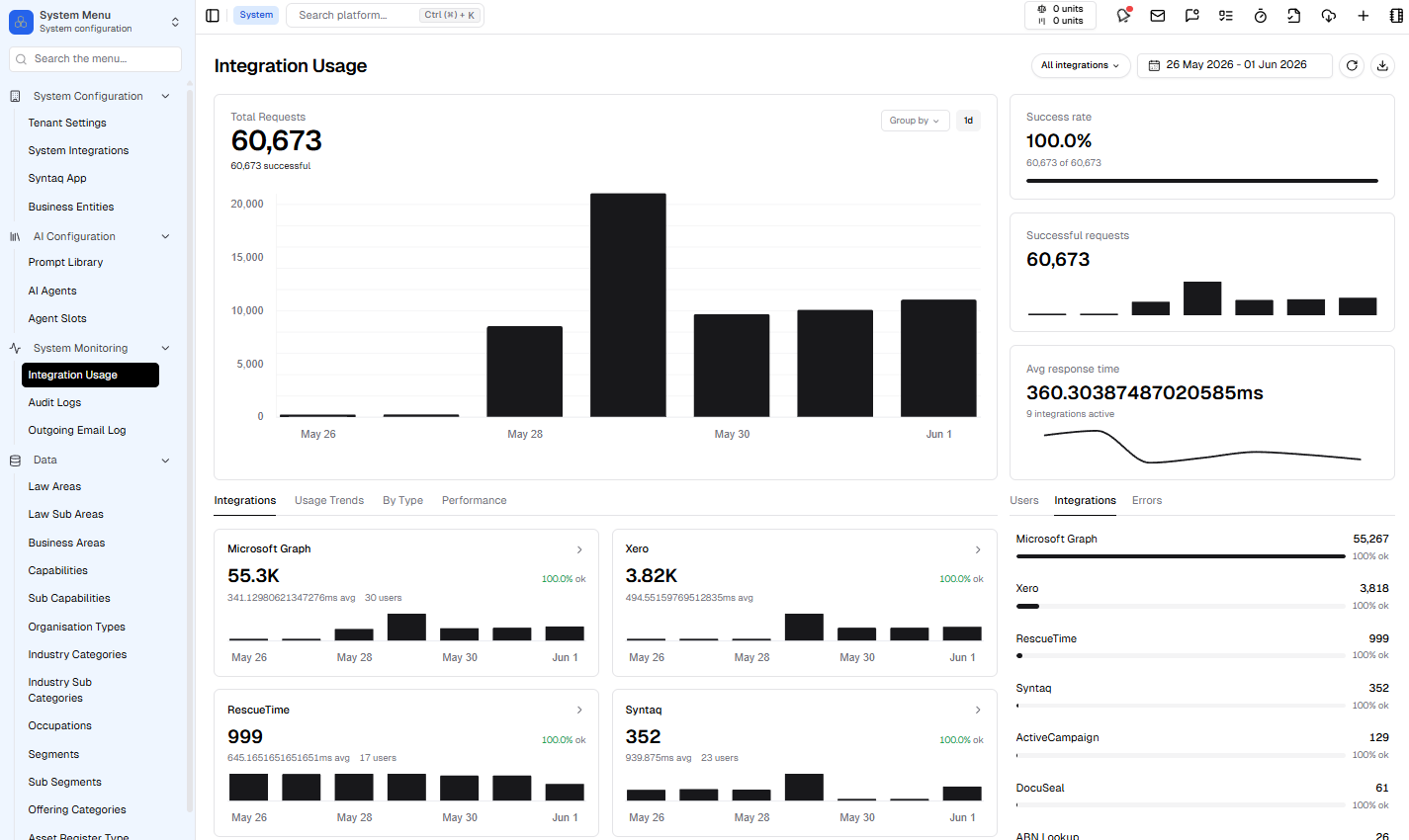
- Added an outgoing email log to track emails sent by the system, either automatically or via the email modal
- Admin
- Added Time Entry Analytics page
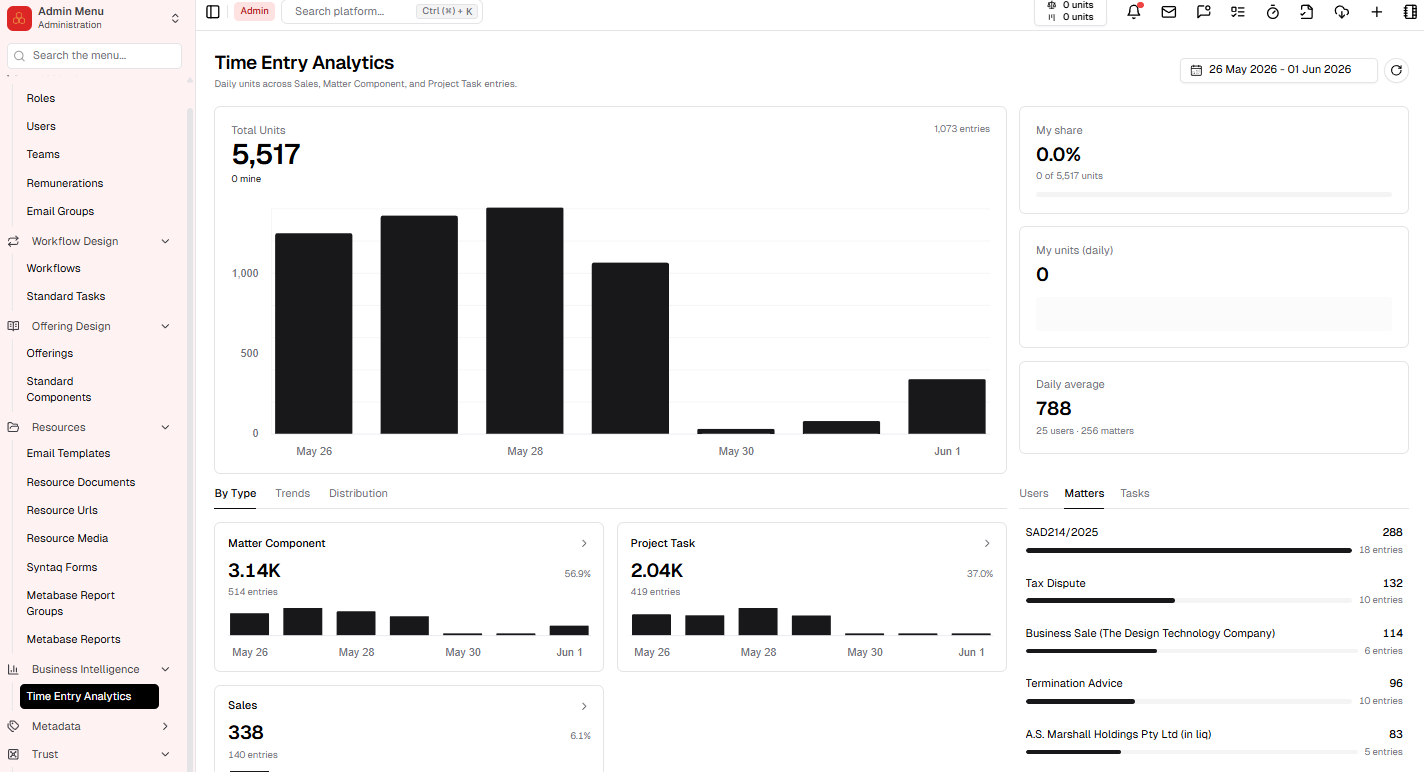
- Added Time Entry Analytics page
Enhancements
V2.22.7
- UI
- Made UI more compact so more information can be seen on screen at once
V2.22.8
- Trust Accounting
- Added an email option for Trust Receipts into the Trial balance table. User will be prompted to draft email with attachment
V2.22.9
- Trust Accounting
- Unknown deposits no-longer appear in reports after being assigned to a Matter, and deposit that was previously unknown now uses the bank transaction date
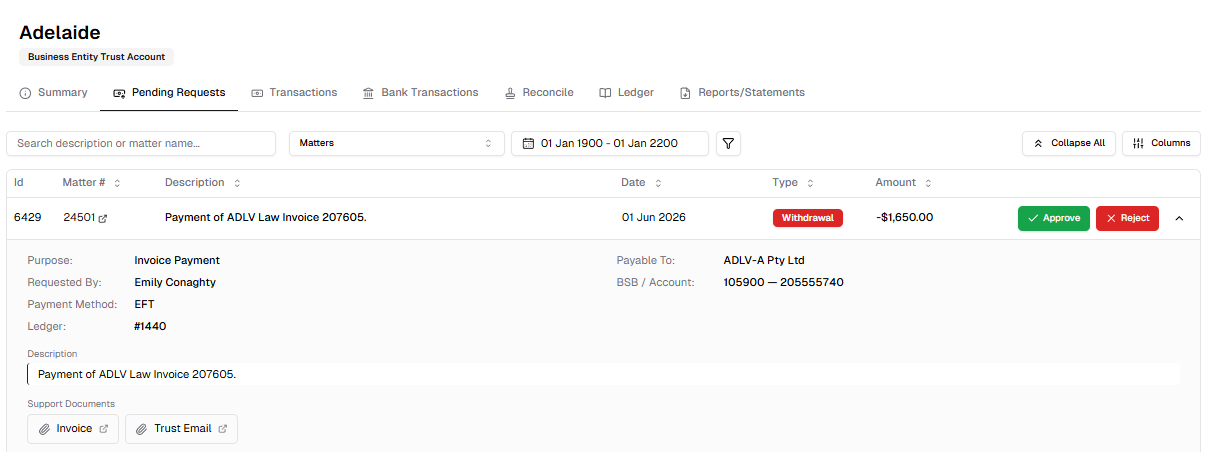
- Pending Requests UI updated with request details being able to be expanded and collapsed, as well as filters by matter, date and ledgers. Matter Id now has a hyperlink.
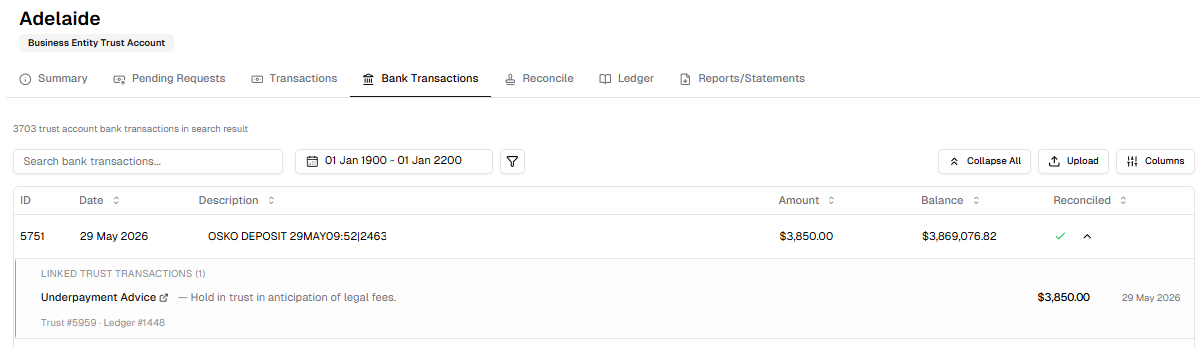
- Bank Transactions UI updated with request details being able to be expanded and collapsed, as well as filters by type of ledger and amount. Matter Id now has a hyperlink and the slide-over modal has been removed
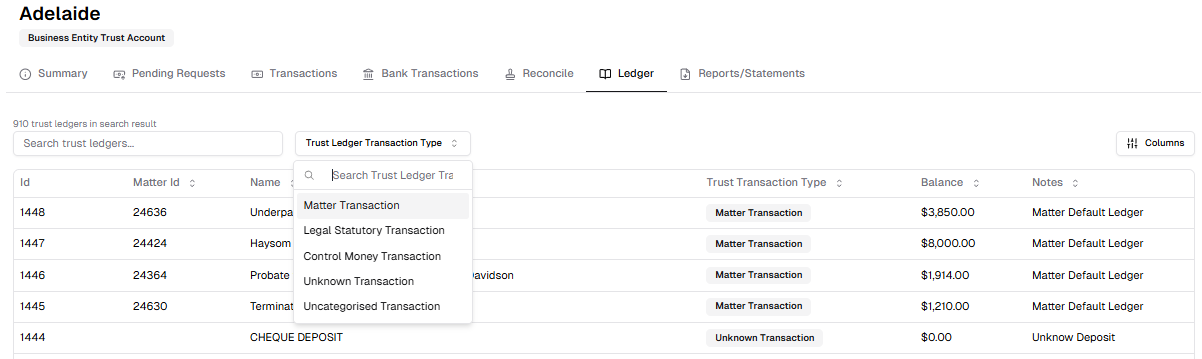
- Added Ledger table able to be filtered by transaction type
V2.22.10
- Matters
- Trust tab on a Matter now reflects the changes to the Admin Trust Accounting tables
Fixes
V2.22.7
- Timers
- Timer no longer starts negative for the first 10s
- Resolved an issue where downlift was not being applied to time entries from timer
V2.22.10
- Email
- Refactored email load to fix slow loading
V2.22.10
- AML/CTF
- Removed an unnecessary permission from AML/CTF
Release 2026-05-25
New Features
V2.22.0
- AML/CTF (feature in staggered release for feedback)
- We are in the process of rolling out the AML/CTF (Anti-Money Laundering/Counter-Terrorism Financing) feature as part of the CRM system, this includes:
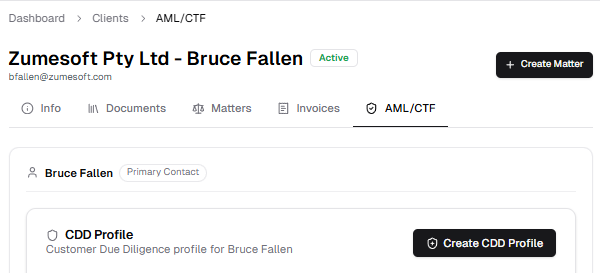
- AML/CTF page for Matters, Clients, Organisations, Contacts; which contains VOI/Customer Due Dilligence items for each entity. This page is the last one in the ribbon when navigating through each entity.
- Integration with Acceleon which allows us to scrape Company extracts for key details
- Integration with Didit which automates VOI process
- Offerings now have a 'Designated Service' flag that indicates whether this offering requires VOI/Due Dilligance.
- AML/CTF page for Matters, Clients, Organisations, Contacts; which contains VOI/Customer Due Dilligence items for each entity. This page is the last one in the ribbon when navigating through each entity.
- When you start a Matter under an offering that requires VOI/Due Dilligance, you will be asked to complete the CDD Profile for the client, this includes:
- Client Disclosure Form - this is able to be prefilled by the user, then sent to the client to submit within Portal
- VOI for all beneficial owners or controllers of the Client.
- Full CDD Assessment including Risk Assessment, Identity Collection, Screening & PEP Determination
- More comprehensive information is to come on this feature in the future.
- We are in the process of rolling out the AML/CTF (Anti-Money Laundering/Counter-Terrorism Financing) feature as part of the CRM system, this includes:
V2.22.2
- Groups
- Added a new item to the CRM section of the platform called Groups. This allows you to link related organisations and contacts. Adding a Client to the Group will automatically populate the Client Contacts and Organisation into the group structure. All safe storage is aggregated from the contacts and organisations under the Group structure.
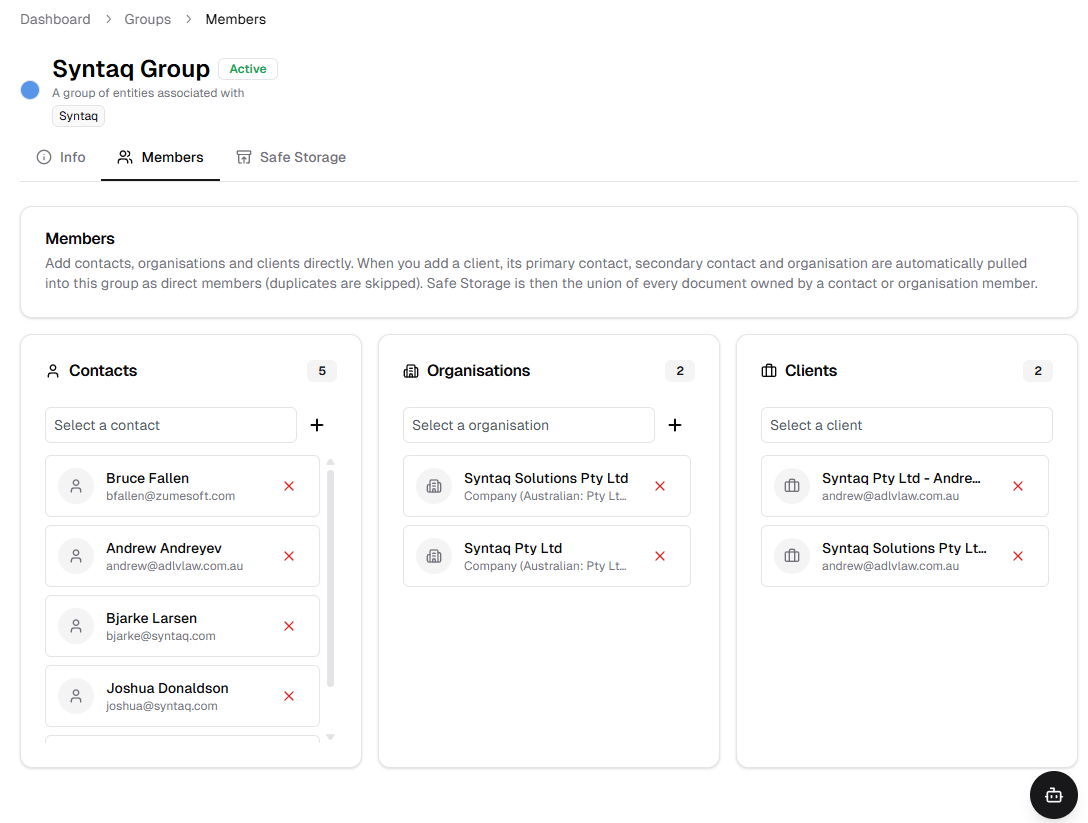
- Added a new item to the CRM section of the platform called Groups. This allows you to link related organisations and contacts. Adding a Client to the Group will automatically populate the Client Contacts and Organisation into the group structure. All safe storage is aggregated from the contacts and organisations under the Group structure.
V2.22.4
- Data Centre
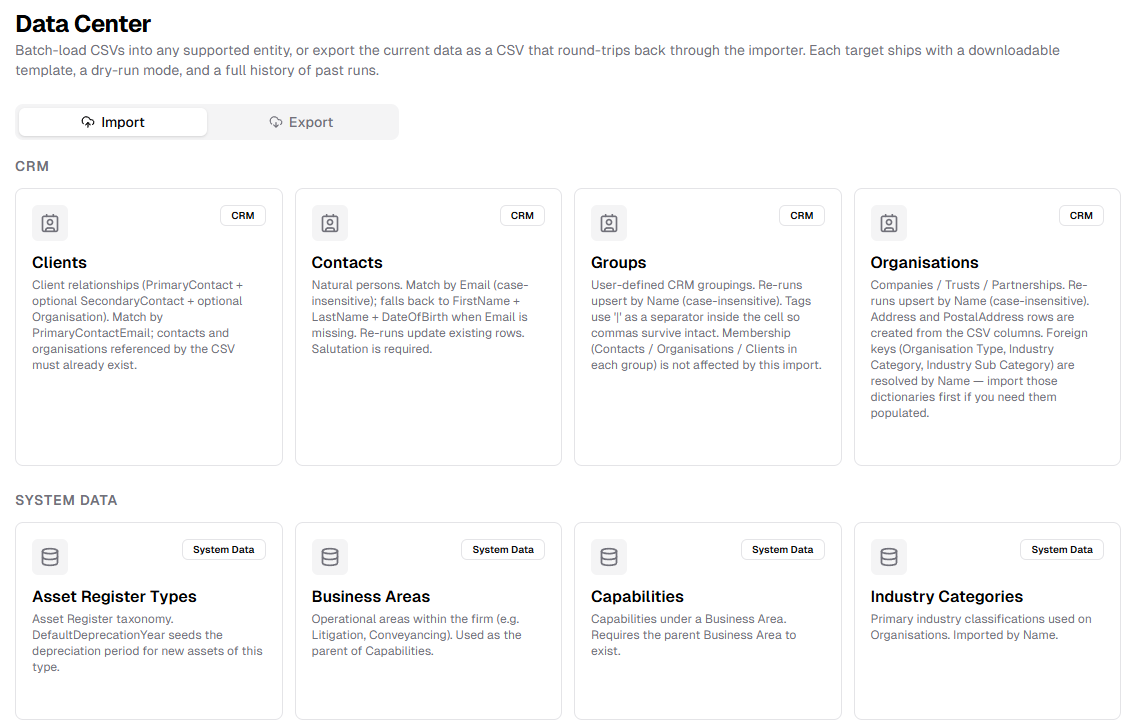
- System menu now has a Data Centre which allows you to import and export Portal data related to any of the entities, allowing for easier provisioning of data, as well as easier access to data.
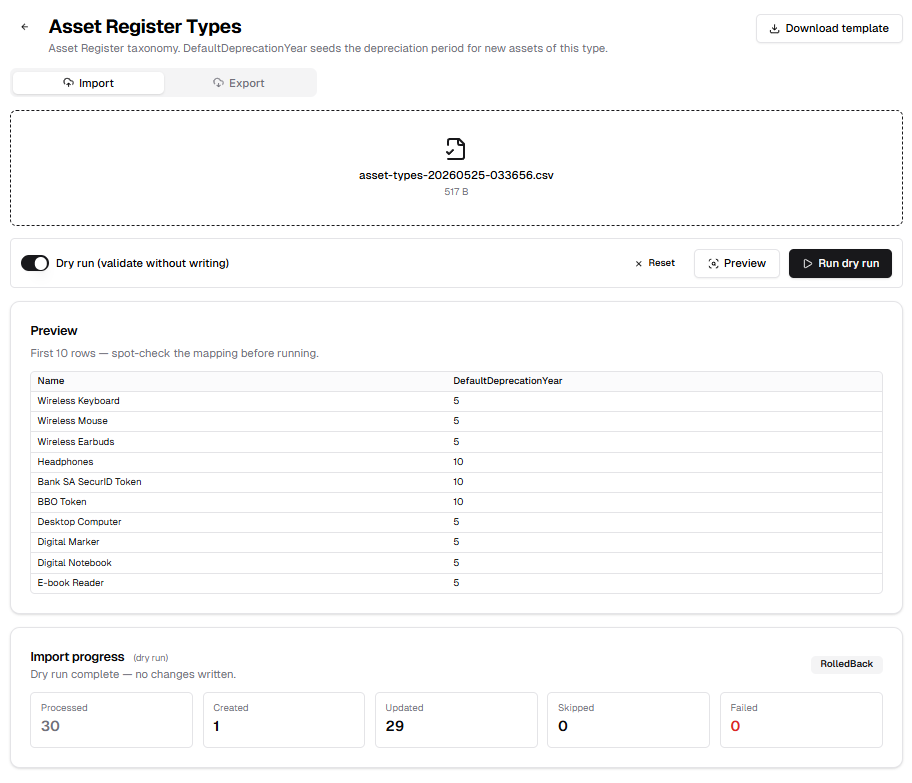
- Import Data function allows you to perform a 'dry run' showing what data will be passed into the system if the user imports a specific file. This allows the user to modify the source file before committing the data to the database. To make sure your data is in the correct format there is also a Download Template button.
- System menu now has a Data Centre which allows you to import and export Portal data related to any of the entities, allowing for easier provisioning of data, as well as easier access to data.
Enhancements
V2.22.0
- Relationships
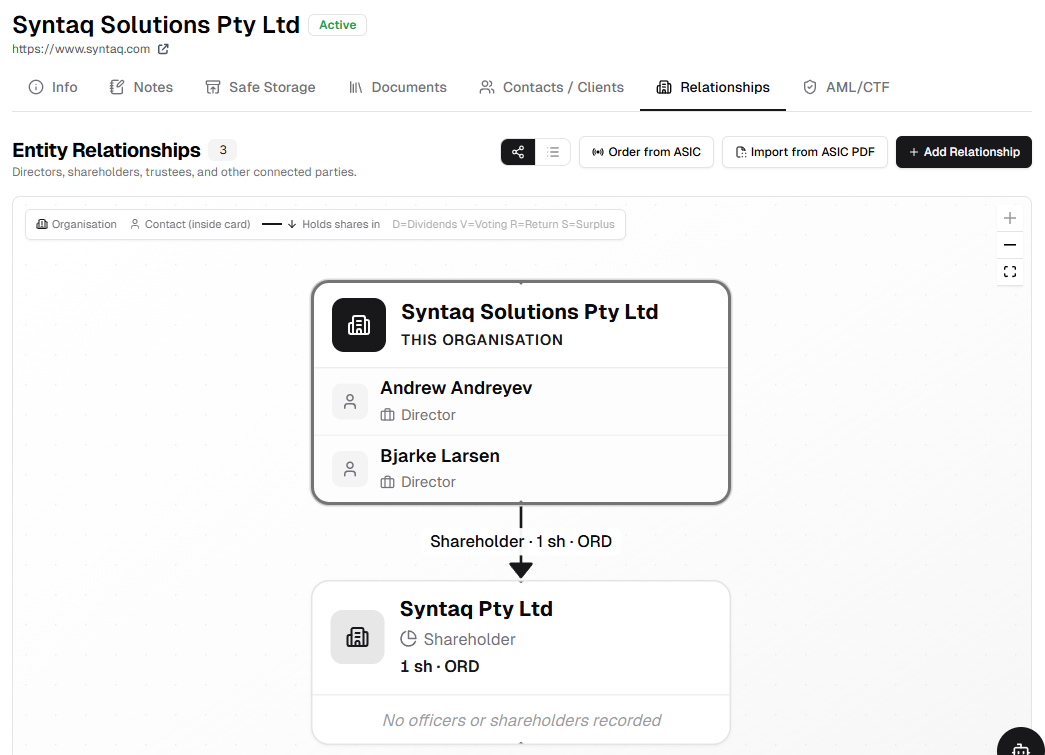
- Relationships for Organisations have been refactored to support the AML/CTF update. Here you can order an ASIC extract (this incurs a cost per-order), import the structure from an ASIC Extract, or manually add relationships via the buttons on the top right. This page can also be viewed in flowchart or list view.
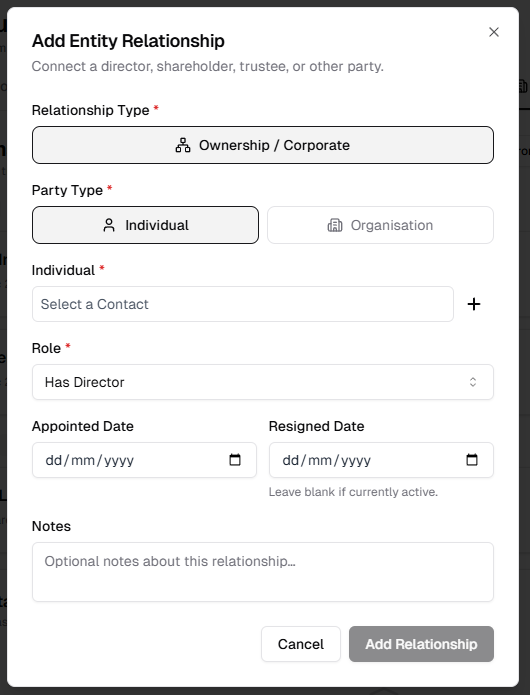
- Manually adding a relationship also has a new input modal, allowing you to add a contact and define their role within the organisation, along with extra details like shareholdings (if relevant)
- Relationships for Organisations have been refactored to support the AML/CTF update. Here you can order an ASIC extract (this incurs a cost per-order), import the structure from an ASIC Extract, or manually add relationships via the buttons on the top right. This page can also be viewed in flowchart or list view.
V2.22.4
- Contacts
- New encrypted input fields for TFN and DIN
V2.22.5
- Organisation
- New encrypted input field for TFN
Fixes
V2.22.0
- UI
- Floating windows now layer most recently clicked item on top
- Any dialog modals will layer on top of floating windows
V2.22.2
- System
- Fixed an issue with dynamic parameters and tokens that could result in unintended login issues for client-facing forms (as part of the AML/CTF process)
V2.22.3
- AML/CTF
- Resolved an issue where the links to the Client Disclosure Form would not be sent by the email service
- System
- Added a migration helper tool to help with Docker builds
V2.22.4
- Groups
- Fixed a scrolling issue within the lists of entities under a Group
V2.22.5
- System
- Resolved an issue with Organisation status while running imports
Release 2026-05-06
Enhancements
V2.21.4
- UI/UX
- Tables for Clients, Contacts and Organisations now have a new option in the Status filter of All, which will show all items in the list, regardless of status
- Made the multi-select status filters more responsive for Matters, Project Tasks and Invoices
Fixes
V2.21.5
- UI/UX
- Tightened up display areas on text editors used in notes for Clients, Projects and Invoices
V2.21.6
- Timers
- Updated the way timers sync to avoid slowdown of site and to stop timers shorting out after being left running for a long period of time
Release 2026-04-21
Enhancements
V2.21.2
- Auto-Time Entries
- Auto-Time Entries are now synced every hour between 9am and 5pm (local time)
- Contracts
- Tightened up the integration with thrid party provider. Contracts are now deleted from both systems on delete in Portal
Fixes
V2.21.2
- Auto-Time Entries
- Resolved an issue where removing Matter ID from merged time entry description would not unlink the time entry from the matter
- Can now assign a merged time entry to a Project after unlinking from a Matter
V2.21.3
- System
- Updated token refresh process to limit impact on users and patch leaks, including an increase in session length
- UI
- Made pagination more obvious to help resolved a display issue with datatables that made finding time entries and disbursements difficult
Release 2026-04-07
Enhancements
V2.21.0
- Auto Time Entries
- Updated the regex filters in the backend to make the AI draft time entries more efficient
V2.21.1
- System
- Syntaq App integration wording for Acknoledgement of Receipt of Asset App updated to better reflect document produced
Fixes
V2.20.28
- Timers
- Timers now correctly record the user against the entry
- Clients
- Resolved an issue where the client list was displaying on the page in reverse order
- System
- There will no longer be issues with the invoice sync process, if Xero is not configured
- Made some changes to help patch a memory leak
V2.21.1
- System
- Resolved a permission issue for AI integration configurations
Release 2026-03-27
New Features
V2.20.20
- Microsoft Connection Status
There is now a status icon that appears at the top of the page in Portal which notifies you when your Microsoft session has timed out. If you see the ‘Offline account - Microsoft disconnected’ flag, simply click it to be taken to your profile page, and click ‘Re-authorise with Microsoft’ to reconnect.
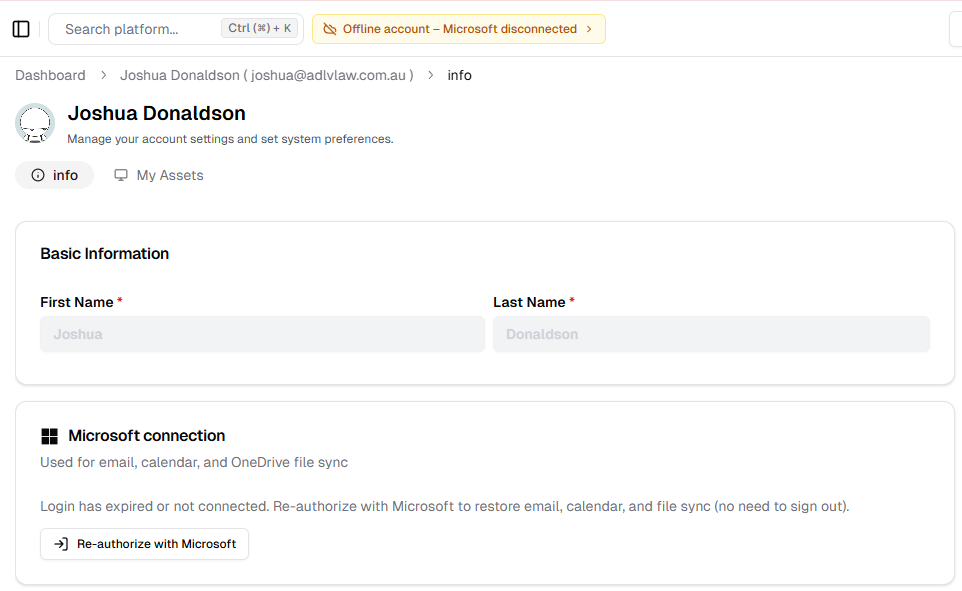
This will save you from having to log out and log back in again. Checking if you have a disconnected notification at the top of the page should be the first check before you send a bug report!
V2.20.21
- Support
- There is now a menu link to the new Portal Support Documentation site. Wiki is still available as this is being updated.
Enhancements
V2.20.23
- Emails
We now have an unlink function that allows you to remove the association between the email and the Matter, Client or Contact, where an email might have been synced in error
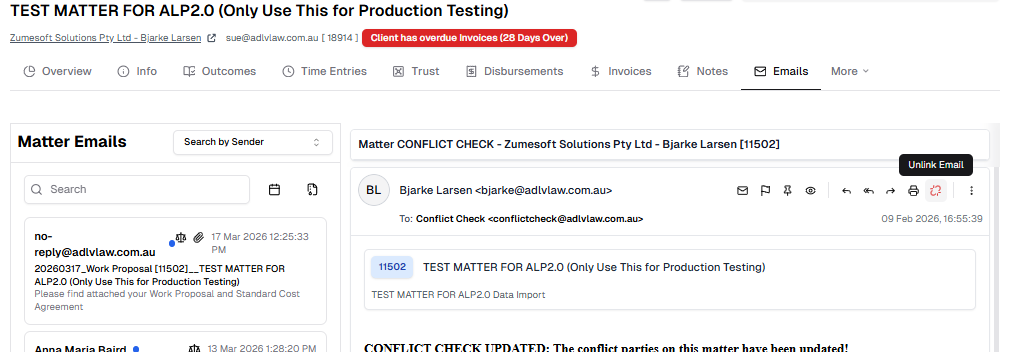
After clicking ‘Unlink Email’ the email will no-longer appear in that list
V2.20.24
- System
- Refactored migration scripts
- Refactored Xero integration
V2.20.25
- System
- Can now set more email addresses for Syntaq apps in the Tenant settings
- Forms
- Matter Office data now pulled into forms
V2.20.26
Offerings
- Offering Outcome Components now have more fields:
- Team description: Instructions on what the team member must do to complete the task. This will be visible only to the Portal user
- Invoice description: This description will flow through into the invoice entry for fixed price invoices.
- Work Proposal Description: Updated field name of the current field Description
- Title: Remains the same
- Offering Outcome Components now have more fields:
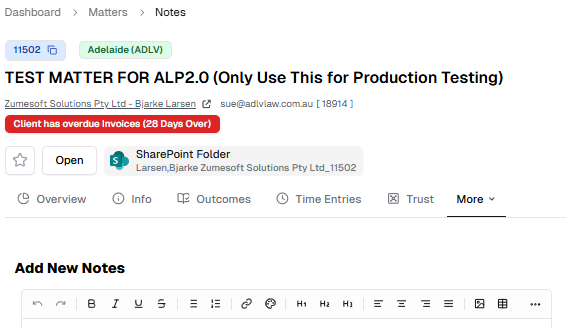
UI
Entity Navigation menu now collapses extra pages into a ‘More’ tab instead of adding a horizontal slider, when window is narrow
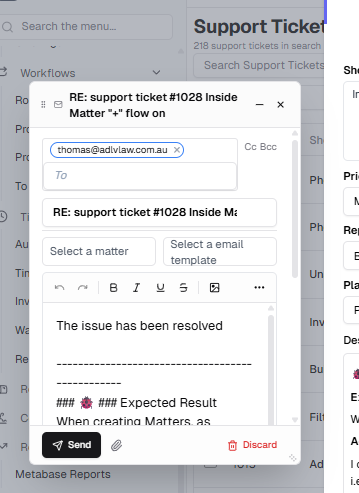
Email
Drafting Emails in Portal now creates a floating pop window to edit your email in
V2.20.27
- Timers
Added ‘Confirm and Duplicate’ option to Time Entry via Timer modal
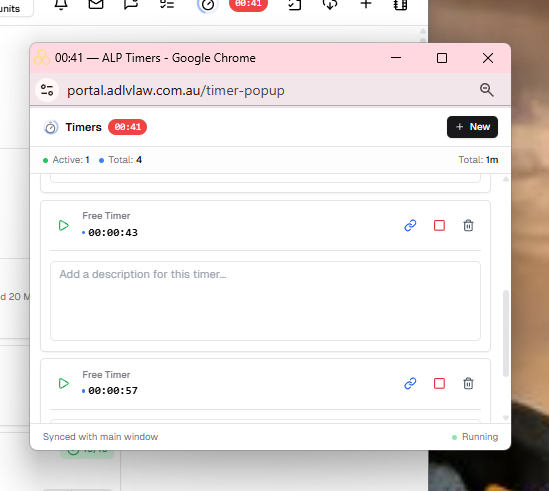
Timers can now be popped out into their own floating pop window or a new tab.
Click the pop out icon beside the add new button and select either:
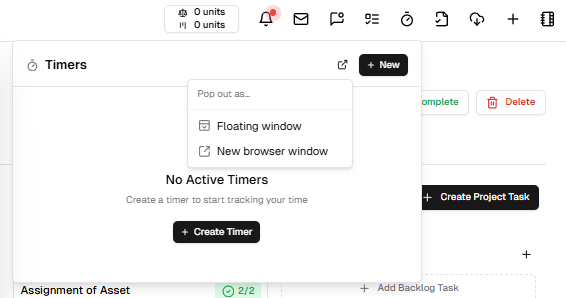
Floating Window, for an in-window pop-up:
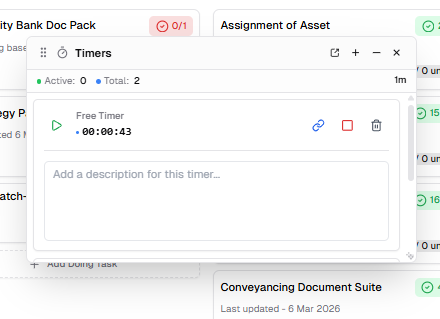
or New browser window, for an external pop-up:
Fixes
V2.20.20
- System
- Updated CSV import headers for eight different admin tables
- Fixed an issue in the pipeline regarding static web-apps
V2.20.21
- Matter/Client/Contact
- Resolved an issue where adding a client or contact from another create modal would exit out of the original modal, causing workflow setbacks
- Matters
- Resolved an issue with Outcomes not being able to be added correctly in some scenarios
- Resources
- Removed dead links
V2.20.22
- System
- Resolved an issue with test-case dependencies
V2.20.23
- Email
- Resolved an issue stopping users from flagging synced emails in Portal correctly
V2.20.24
- System
- Fixed an issue with hard-coded domains for integrations
Documentation
V2.20.20
- Cleaned up the file structure of developer documentation
V2.20.21
- Release Notes and user guide imported
Release 2026-03-17
Enhancements
V2.20.8
- System
- Added Tenancy Onboarding Settings, and updated login mechanism to work across each iteration of the platform
- Reworked login authentication method for security purposes
V2.20.11
- System
- Updated the UI for the Tenancy Onboarding workflow
V2.20.15
- Matters
- Added contact email input fields for Opposing Counsel and Other Parties
V2.20.16
- Documents
- Replaced Adobe PDF viewer with browser PDF viewer
- Permissions
- Updated user permissions to be able to view more aspects of the platform by default
V2.20.19
- System
- Updated deployment pipeline
Fixes
V2.20.8
- Invoicing
- Invoice list now refreshes correctly after selecting approve or send
- Fixed a timing issue with syncing invoice calculations with Xero
- Users
- User images now pull through to all relevant locations correctly
V2.20.10
- System
- Fixed an issue with authentication on redirect
- Matters
- Resolved an issue with updating law area which could lead to a misalignment with the law sub area
V2.20.11
- System
- Resolved an issue with hangfire dashboard access
V2.20.12
- System
- Made reference location for documents dynamic
- Emails
- Resolved an issue where emails with ids under a certain number would not show attachments
V2.20.13
- System
- Updated the dynamic reference location method
V2.20.14
- System
- Fixed issues with test cases after recent system updates
V2.20.15
- Matters
- Resolved an issue with selecting offering outcomes
- Contacts
- Phone number input now correctly defaults the area code to Australia (+61)
- Asset Register
- Asset register now correctly refers to Manufacturer
- Email Templates
- Resolved an issue with email template subject lines not updating correctly
- System Integrations
- Added a view configuration button for various integrations
V2.20.16
- Contracts
- Resolved an issue where template would not load
V2.20.17
- Contracts
- Resolved an issue where template would not load on Macs
V2.20.19
- Contracts
- Resolved a configuration issue
- Forms
- Resolved an issue where incorrect data was being added to Forms, causing issues
Release 2026-02-11
Enhancements
V2.20.4
- Contract Signing
- Changed the default on the preparation of a document for digital signing to now not send directly to the signers. This can still be selected, but it must be a conscious choice by the user preparing the document for signing.
V2.20.6
- Email
- Tidied up email sync on internal emails, and optimised email sync process
V2.20.7
- Create Organisation
- Optimised the ABN lookup search return when creating an Organisation via ABN lookup
Fixes
V2.20.4
- Email as pdf
- Can now download emails as pdfs correctly
- Invoices
- Invoice view for reviewers now correctly clears invoices from the list of invoices waiting for approval, once approved.
V2.20.5
- Offerings
- Merging Offering Outcome Components now correctly sets the component id, and resolved some UI issues
V2.20.7
- Asset Register
- Resolved an issue with the Office filter in the Asset register
- Workflows
- Business Capability is now cleared when Business Area changes in a workflow
Release 2026-01-29
Enhancements
V2.19.16
- Safe Storage
- Updated UI
V2.19.20
- Email Sync
- Updated Email Sync process to better sync folders and fix request issues
- Outcomes
- Matter Outcomes now have a link to the Offering folder in SharePoint
V2.20.0
- Email
- Can now preview attachments in the email view
V2.20.1
- Organisations
- Updated UI for the Add Organisation via ABN Lookup modal
V2.20.2
- Outcome Resources
- Resource Panel now sticks to the window when scrolling, and only shows when a Resource is clicked.
- Email Template Resources
- Clicking an email template resource will open the template as a new draft email
- Document Upload
- When uploading multiple documents to the Portal the user is now able to set metadata for each document at the same time.
V2.20.3
- Offering Resources
- Resources now migrate when Offerings are merged
Fixes
V2.19.15
- Asset Register
- Fixed issue with Asset Name
V2.19.16
- Safe Storage
- Fixed issue with UTC time
- Collection Reminders
- Fixed a grammar issue with send alert
V2.19.17
- Email
- Added attachment icon back into lists where it was missing
V2.20.0
- Offering Outcomes
- List of Standard Components able to be added to an Outcome now only includes active Components
V2.20.1
- Text Editors
- Fixed an issue where using certain elements of the editor would cause the modal to crash
V2.20.2
- Email Template Resources
- Fixed issue where email subject line was not saving after editing a template
- Offering Resources
- Fixed issues with component merge, position shifter and law area not working as intended
V2.20.3
- Matter Documents
- Fixed an issue with pagination for documents tab in Matters
Release 2026-01-21
Enhancements
V2.19.11
- Staff Directory
- Reworked the Teams Tree View to only show staff members at the lowest level of the tree
- Emails
- Can now search inbox by sender contact name. Previously this was only searchable by email address.
- Invoice Collection Letters
- Added missing date to reminder letters. Updated UI.
- Admin Menu
- Added Default filters of Active to pages in the Admin menu:
- Users
- Standard tasks
- Offering categories
- Offerings
- Offering Standard Components
- Segments
- Subsegments
- Teams
- Added default filter of Type is Project or Routine & Status is Open for Project templates in the Admin Menu
- Added Default filters of Active to pages in the Admin menu:
- Matter Outcomes
- Updated colours of this page to match the Outcome page under Offerings.
- Outcome deletion is disabled when time entries are assigned to an Offering component.
V2.19.13
- Resources
- Added filters for business area, category type and tags to the resources page
- Resource Documents now have a column for Last Updated date
V2.19.14
- Mail Register
- Updated UI for Print, Date Sent, Date Received and Record Information
- Business Entity
- Refactored the Business Entity framework
Fixes
V2.19.11
- Staff Directory
- Removed Teams Org Chart
V2.19.13
- Page Filters
- Fixed an issue where filter would not save to cookies properly
V2.19.14
- Emails
- Fixed an issue where email would not get assigned to a Matter or Project correctly
- Offerings
- Fixed an issue where a user could not be the owner of more than one Offering
Release 2026-01-07
New Features
V2.19.0
Offering UI
- Complete refactor of the Offering UI to include Resources in line with the Offering, Outcome or Component they are associated with.
Offering Design
Users with permissions to view Offerings from the Admin menu are able to add Resources at each level, by clicking the Add Resource button beside the relevant Offering, Outcome or Component.
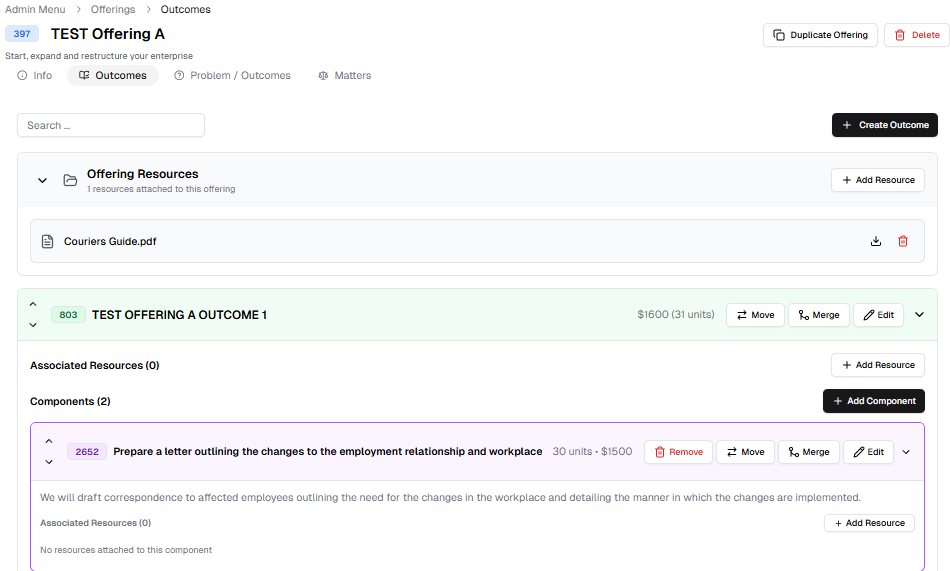
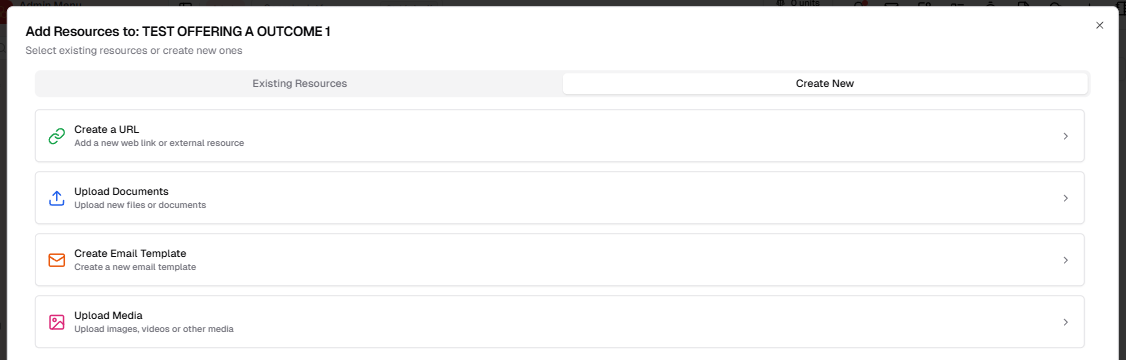
Resources can now be documents (pdf or docx), urls, Syntaq Forms, email templates or media (images or videos). Assigning existing or new Resources to the Offering is done via the Add Resource modal, which has been updated.
Matter Outcome Resources UI
Matters inherit Resources from Offerings, Outcomes and Components at point of creation. Matters with Resources will allow the user to preview the Resources in the side column.
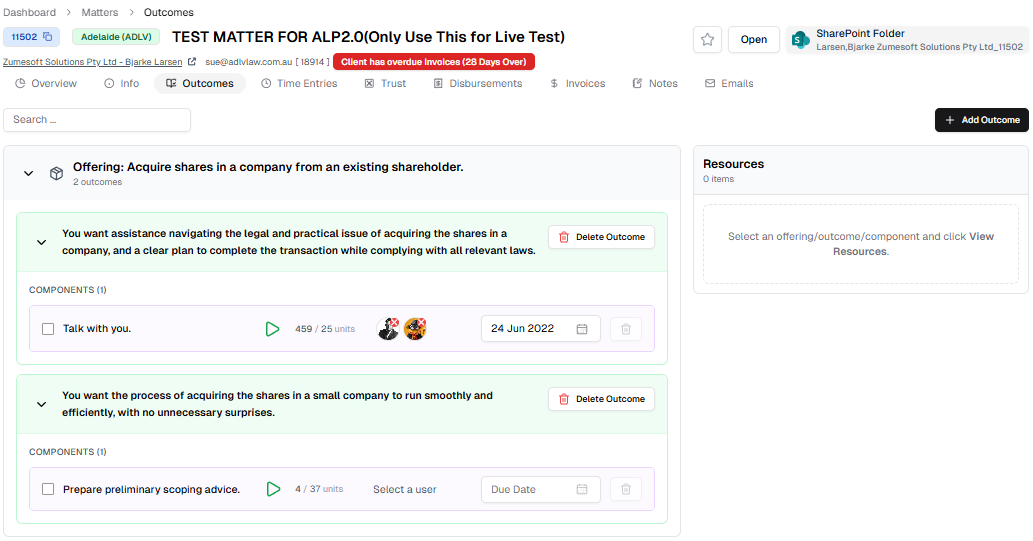
The UI is in place here, but functionality is still WIP.
V2.19.1
- Offering Resources
- Youtube Video and Word Document Resources can now be previewed natively within Portal
V2.19.7
- System Menu
- Active Campaign, Wiki, Docuseal, Sharepoint, Tika, and Metabase integrations are now configurable from the Integration Management area of the System Menu
V2.19.8
- Syntaq Integration
- Syntaq Apps used in Trust Accounting, Invoicing and various other areas of Portal can now be configured and set from the Syntaq Integration page via the System Menu
Enhancements
V2.19.2
- Syntaq Records
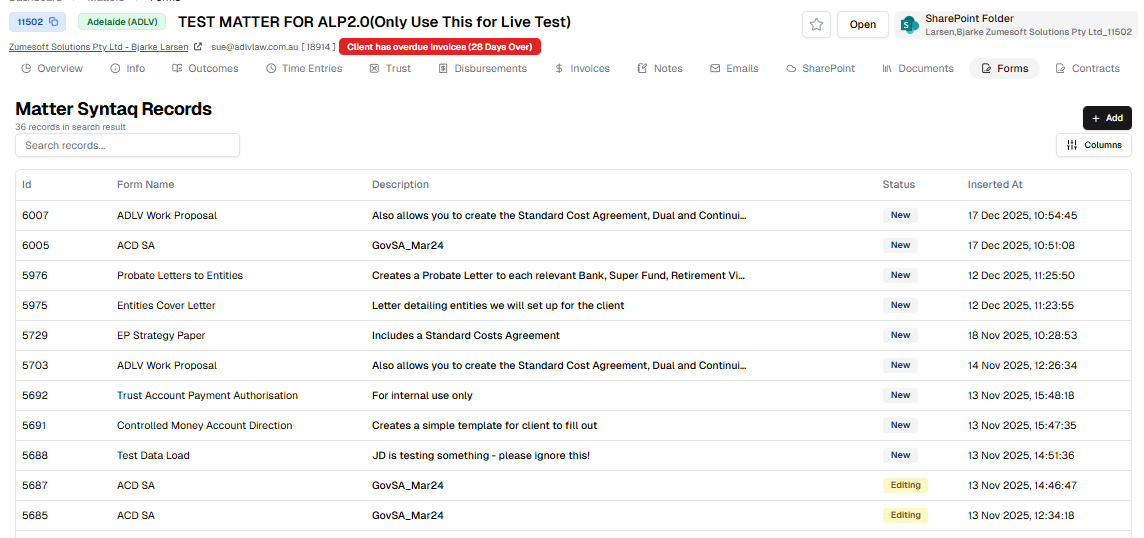
The Forms page in a Matter now lists all the Records for that Matter, instead of the Forms.
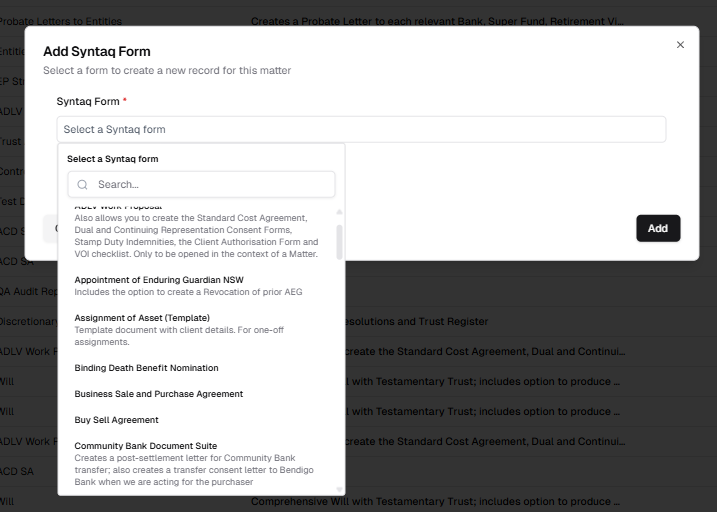
To start a new Form, click Add. You will then be asked to select which from you want from the full forms list.
Fixes
V2.19.3
- UI
- Fixed issues with non-standard buttons
V2.19.5
- Trust Accounting
- Fixed issues with UI affecting Trust Reports
V2.19.6
- Syntaq Forms
- Fixed scrolling issue with Syntaq Form selection in new Add Syntaq Form modal